
Your money, in focus
A private money book that stays on your device
Qash Compass helps you record what you earn, spend, owe and plan, and shows where your money stands, without a bank connection, an account or adverts. Your records are kept on your own computer or phone.
Windows 3.3.0 from the Microsoft Store. Windows 10 (version 1809 or later) or Windows 11, 64-bit. The button opens the Microsoft Store app on Windows; you can also search for "Qash Compass" in the Store.
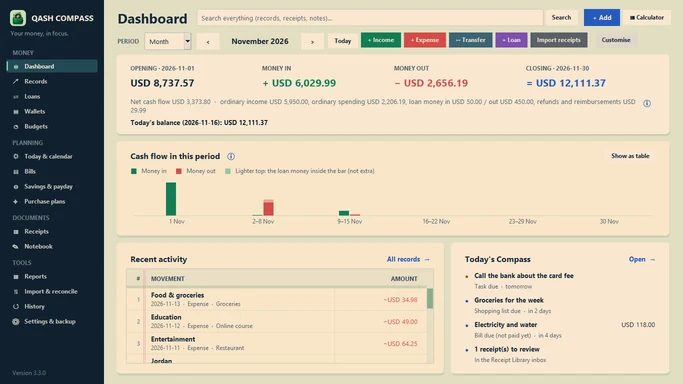
Windows 3.3.0, sample data.
Where Qash Compass is available
Preview
Windows 3.4.0
Private Microsoft Store package flight, awaiting certification. Not publicly released yet. Features marked Preview on this site belong to this version.
In testing
Android 1.1.0
In testing. Not yet available on Google Play. There is no download link yet; this site will show one when it is released.
Who it is for
Qash Compass is for people who want a clear, private record of their own money: someone keeping a household budget, a freelancer watching money in and out, a person paying off a loan or a card plan, or anyone who prefers to keep financial records off the internet.
See where your money is
Keep cash, bank accounts and mobile money in separate wallets. Each wallet shows its balance from its opening amount and the records since, so "Money available" on the Dashboard is a figure you can trace.
Understand what you spend
Every income and expense has a date, an amount, a category and a wallet. Reports show spending by category, month by month, and a refund lowers spending instead of counting as income.
Keep loans honest
Money you borrow or lend is tracked as a loan, not as income or spending. Repayments lower what is owed, and a repayment plan can split each instalment into principal and interest.
Plan the next weeks
Bills, savings goals, planned purchases and tasks appear in Today's Compass, and "Until payday" estimates what is left after bills and money set aside.
Keep receipts with records
Import a photo or PDF of a receipt. On Windows the text is read on your computer by Windows' own text recognition, and the total, date and shop are offered for you to check.
Back up on your terms
Create a full backup whenever you like, protected with a password if you choose, and keep it where you decide: a USB drive or your own cloud storage.
A private, offline approach
Your records stay on your device. Qash Compass has no Qash Compass account, no bank connection, no adverts and no analytics. It works offline: you can record, review and plan without an internet connection.
Files leave your device only when you choose. A backup, a report or a transfer file is saved where you pick, and you decide what happens to it.
The internet is used for purchases. Buying or restoring paid access goes through the Microsoft Store (Windows) or Google Play (Android), which need a connection. The stores handle payment; Qash Compass never sees your card details.
Wi-Fi sync is optional and local. In the preview versions, a phone and a computer you have paired can sync directly on your own Wi-Fi network, encrypted. Nothing goes through the internet or through us. Preview
Read the full privacy policy.
A closer look
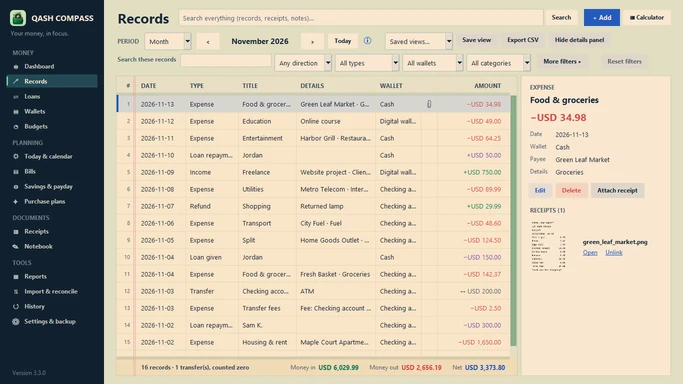
Records with filters and totals (Windows 3.3.0).
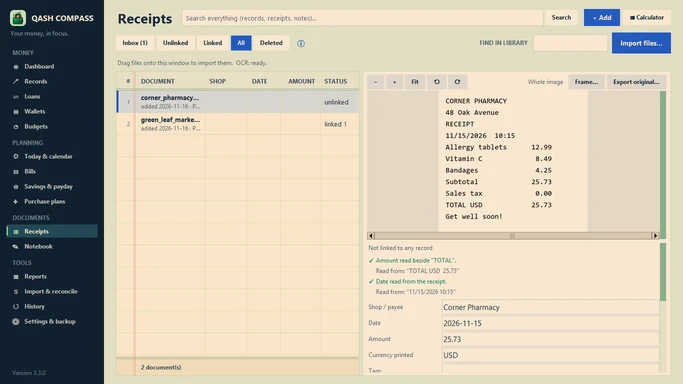
A receipt read on the computer (Windows 3.3.0).
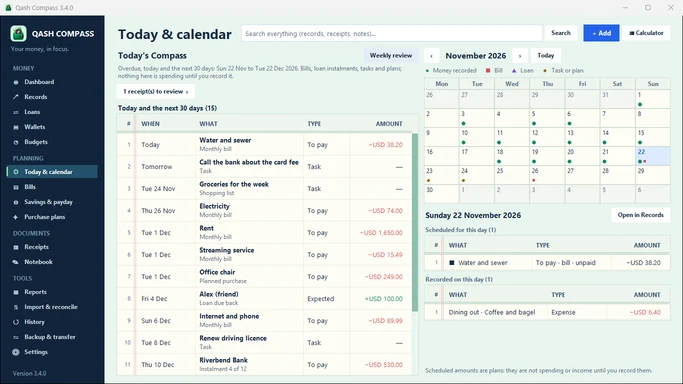
Today & calendar Preview 3.4
New to Qash Compass?
Start with the getting-started guide: set your currency, add your wallets with their opening balances, and record your first income and expense. It takes about ten minutes.